
Week 11: Finishing Touches and the Final Application!
May 9, 2026
Hello everybody and welcome back to my Senior Project Blog! I’m excited to share that I’ve essentially completed my project and am all but ready for presentation next Saturday on May 16! I have quite a bit to get into, so let’s get started.
Analyzing Data, but with graphs
Last week I promised that I would have graphical analyses for the rubric data I collected, so here they are:
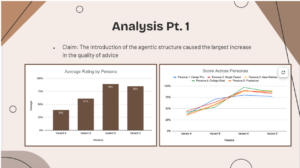
These first two graphs simply show the average rating by persona and then the individual ratings for each persona across each variant. As I said in my previous blog, Variant C slightly outperformed Variant D across the board due to the rigor and care it takes going to each agent at a time without attempting to skip any agents.
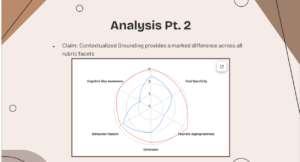
This web chart compares the average score across each dimension for Variant A (in blue) and Variant B (in red). As we can see, Variant B outperforms Variant A in every single metric, showing that by simply adding the contextualizing documents we were able to see marked improvement in results.
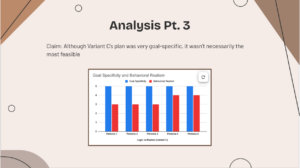
This next graph is a more nuanced take on the field “goal_specificity” and “behavioral_realism”. Goal specificity for Variant C across the board received a 5, as it should. However, behavioral realism struggled in comparison, only receiving a 3 or 4 on all occasions. What this shows is that the goal specificity and behavioral realism metrics may be negatively correlated as it’s hard to make an extremely detailed plan that is also feasible for the average consumer.
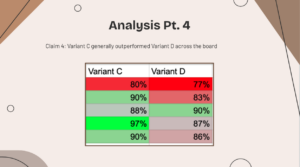
Lastly, we have a comparison of Variant C and Variant D across the 5 personas. For every persona, Variant C performed better except for Persona 3. Persona 3 is of an elderly individuals with high net worth but poor asset allocation and a lot of debt, typically scenarios you tend not to apply baseline heuristics for, which is why Variant D excelled by skipping Agent 2 and moving straight to Agent 3.
The Full Stack App
Now we come to designing the full-stack architecture of the application. Up till this point, my entire program had been running locally on my computer. I had a python program that called an API and returned a JSON. I then ran four python files back-to-back (for Variant C), or called them situationally (for Variant D), and noted their responses as .json files. However, now comes the age-old problem of transferring code that works locally on your laptop into something that anyone can use anywhere at any time.
Asynchronous Endpoints and Wrapping the Backend
The first step in order to make code like this deployable is to wrap them in something known as endpoints. An endpoint is a URL that triggers a python function or python file. These are defined as @app.post in the code. All functions within this block are defined as “async def” (def is the traditional way of defining a function/method in python). Asynchronous calling allows the computer to process requests parallely. In essence, if I wanted to call “def run_variant_c”, it would take me up to 90 seconds to receive a response, which is valuable time that the computer is wasting. Instead, defining it asynchronously allows the frontend to call different endpoints while one is still running, helping streamline run-time and allowing for scalability. The Python library that does this is known as FastAPI.
Example of an API endpoint for Variant A.
@app.post("/run/variant-a", response_model=ProseResponse)
async def run_variant_a_endpoint(request: PersonaRequest):
   """
   Variant A: Simple prompt.
   Sends the persona directly to Gemini with no grounding documents
   and no pipeline. Returns plain prose.
   """
   start = time.time()
   try:
       result = await run_in_thread(run_variant_a, request.persona)
       return ProseResponse(
           variant="variant_a_simple_prompt",
           persona=request.persona,
           duration_seconds=round(time.time() - start, 2),
           result=result["response"],
       )
   except Exception as e:
       raise HTTPException(status_code=500, detail=str(e))
CORS Middleware
For security purposes, almost all browsers block websites from talking to different servers without explicit permission from that server. As a result, I had to implement CORS (Cross-Origin Resource Sharing) middleware that essentially lists all the valid URLs that are allowed to access the API endpoints. In this, I’ve only listed the domain of my final application, so no other website on the internet can inadvertently call my functions.
CORS Middleware as defined in the main python file.
app.add_middleware(
   CORSMiddleware,
   allow_origins=["https://personal-finance-assister.vercel.app/"],
   allow_credentials=True,
   allow_methods=["https://personal-finance-assister.vercel.app/"],
   allow_headers=["https://personal-finance-assister.vercel.app/"],
)
The JavaScript Bridge
When designing a frontend, it always uses HTTP (Hyper-Text Transfer Protocols) to send requests. However, the Python files do not receive HTTP requests, so we need to translate them. As a result, in my codebase I created a JavaScript file “api.js” that converts the user’s input into a JSON object and sends it to the FastAPI URL. The file also waits for the backend to complete its work and receives the output to send to the final frontend file.
This function appends the endpoints to the main URL and awaits for the response, and stringifies the JSON.
const API_BASE_URL = import.meta.env.VITE_API_URL || "http://localhost:8000";


export const runAgentPipeline = async (variant, persona) => {
 const endpoints = {
   'A': '/run/variant-a',
   'B': '/run/variant-b',
   'C': '/run/sequential',
   'D': '/run/hierarchical'
 };


 try {
   const response = await fetch(`${API_BASE_URL}${endpoints[variant]}`, {
     method: 'POST',
     headers: {
       'Content-Type': 'application/json',
     },
     body: JSON.stringify({ persona }),
   });
This codeblock runs the request for all four variants (because all four run at once on the final app)
export const runAllVariants = async (persona) => {
 const variants = ['A', 'B', 'C', 'D'];


 const promises = variants.map(v => runAgentPipeline(v, persona));


 return await Promise.allSettled(promises);
};
Frontend Design
The entire frontend for the project is contained in a file titled “App.jsx”. There are a bunch of state variables defined at the top which hold values of states in the frontend, such as the state of the text box, the loading state, the error state, the copy/paste state, and more.
 const [persona, setPersona] = useState('');
 const [loading, setLoading] = useState(false);
 const [results, setResults] = useState({});
 const [errors, setErrors] = useState({});
 const [secondsElapsed, setSecondsElapsed] = useState(0);


 const [expandedCards, setExpandedCards] = useState({});
 const [copyStatus, setCopyStatus] = useState({});
Every single button in the frontend is connected to the JavaScript, which then handles the API calls and returns the raw JSON outputs. The frontend then formats these raw JSON outputs. For Variants A and B, it converts the JSON into markdown and then into readable text. For Variants C and D, it displays the Agent_3 plan and the Agent_4 summary. All of this uses a frontend framework known as React. It then exports the HTML for deployment.
Actually Transferring the Code Onto a Website
Now that we’ve done the code, we need to actually transport it to a place where it’s always accessible by these URLs. This is where the concept of a Docker comes in. We create a Dockerfile, which is essentially a file that tells a hosting service to first download python, then import all the necessary libraries that were used in this project, then to import all the python, javascript, and html files that were used to build this project. The Docker then builds this read-only image of the project and exposes the URL so that now the internet can access it.
Now that Docker is created, it needs a place to sit. I decided to use Google Cloud Run (gcloud) to hold Docker. This essentially stores the Docker on Google’s servers, so whenever a request comes in it contacts Google’s Servers and allows me not to use my own computer as a server. Cloud Run is a fully managed service, meaning that Google will automatically scale up and scale down and prevent API clogging, which is super useful and allows me not to have to worry about that stuff.
Lastly, we host the app. I chose to use Vercel to host the app because it’s extremely easy to use and it automatically links with GitHub, meaning any time I stage a commit it auto updates the app. I pointed the Vercel app to the Google Cloud Run, and that creates the functional app!
Obviously this app had a lot more struggles than is mentioned here, but I decided to mostly go over the architectures because I believe it’s more interesting than me going over why error 429 is misleading.
Conclusion
This essentially concludes my project! The only thing left is for me to touch up my slides a bit and then rehearse the presentation. In next week’s blog (week 12), I’ll upload a video of the full final presentation, if you’re unable to make it.
Here are some links for the entire project:
Deployed app: https://personal-finance-assister.vercel.app/
GitHub: https://github.com/arjunmaganti/Personal-Finance-Assister
Slides: https://docs.google.com/presentation/d/1XhS7zedHwRP75OE_ik2_EJmr1wdA_sAoUJHjybQ7Lyw/edit?usp=sharing
Thanks for reading this blog, and I hope to see you after my presentation on May 16!
Reader Interactions
Comments
Leave a Reply
You must be logged in to post a comment.
Hi Arjun, amazing work! It’s been great to see the project progress so well over the last few months. I appreciated how you reflected and discussed your obstacles throughout the project, it made the project feel very authentic and showed how much problem-solving went on behind the scenes. One question I had was: if you had more time to continue developing this idea, what would be the next major feature or improvement you’d prioritize, and why?
Hi Arjun, great work! This is a really solid end-to-end project, and it’s cool to see everything come together in a deployed application.
Congrats on finishing the project portion itself! After these many weeks of work, it’s cool to now see everything finally come together into a proper app. I especially found it quite interesting myself how you went rather in depth when talking about the process of making the API, frontend, and tying it all together. Also, seeing how between all the personas, the architectures’ different specialties made them better in some scenarios and worse in others, do you think there’s a way of combining the benefits of each one to make an overall better framework?