
Week 3: There and Back Again
March 19, 2026
Last week, I added pheromones to the simulation. This week, I ended up changing most of it anyways…
Changes:
If you recall from last week, I made it so ants would wander around. When they spot food, they’d lay down a trail of pheromones back to base that guides future ants.
This works fine for when the ants are in an open field with no obstacles, because after getting the food, I can just assume the ant knows its way around and have it walk in a straight line back home.
Yet this week, when I was trying to give the ants ability to navigate complex territory, I couldn’t have it walk back in a straight line anymore.
One option is to use pathfinding algorithms, but I didn’t want ants to rely solely on these algorithms. The reason for this is because in nature, ants navigating to and from pheromone trails will sometimes wander around and explore new trails in hopes of finding a more efficient path. This leads to a fantastic heuristic pathing that slowly optimizes itself over time, and I didn’t want to take that optimization away from ants.
So I decided to implement a solution that utilizes both. When the ants leave the nest, they’d lay down a “to-home” marker as they explore. After finding food, they’d follow the to-home marker (with a little variance, so the trail can improve over time), while laying their “to-food” marker to guide other ants. In addition, I’d code in a general pathfinding algorithm that in general guides the ants back home.
Note that last week I was against implementing a “to-home” marker, mainly because I said ants avoid laying “to-home” markers passively. This isn’t exactly accurate, as ant species differ from one another drastically. Ants that do long-distance foraging tend to use pheromones as they wander into unfamiliar territory, while ants focused on short-distance foraging tend to rely on eyesight and other senses, as they know the environment well. So, after considering the coolness of a self-optimizing path, I decided to add back in the “to-home” markers.
This is where some problems started to emerge…
Problems:
Pheromone Behavior:
Previously, the pheromones I coded all had an inherent vector coded in. This worked fine for the “to-food” sources, but not for following the “to-home” sources back. A video below shows the issue:
With directional vectors, when paths cross, ants would often be confused on which path to stick with. Additionally, suppose a scout ant took a loop-de-loop while in the process of exploring finding the food. All subsequent ants will follow this loop-de-loop while laying their own trails, reinforcing the loop-de-loop even further. As the complexity of the terrain increases, cases such as “loop-de-loop” resulting from colliding against walls and whatnot would only be more frequent, making it hard for ants to find their way home. In nature, ants fix this by mostly simply traveling towards the direction with highest concentration of pheromones.
So, I came up with an imitation of how ants navigate in nature:
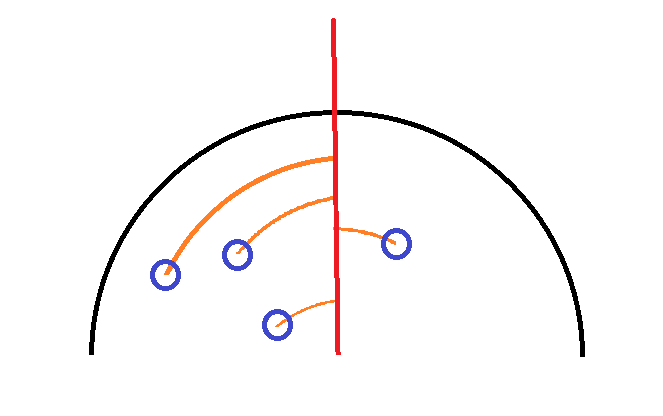
Suppose the blue circles are pheromones, the red line is its current direction, and the black semicircle is the ant’s detection radius. The ant would…
1. Take note of all the pheromones in its detection radius.
2. Record the angles between all pheromones and the direction its currently facing.
3. Calculate a weighted average of the angles (based on how much the pheromones have decayed)
4. Travel in the average direction.
In this case, the ant would turn left slightly.
Lag:
That was great, but after some testing, I discovered that this system is only consistent with more pheromones. Hence, I quadrupled the rate at which ants placed pheromones.
This was when my computer started to be really unhappy with the changes. Attached below is a profiler that displayed how my resources were used: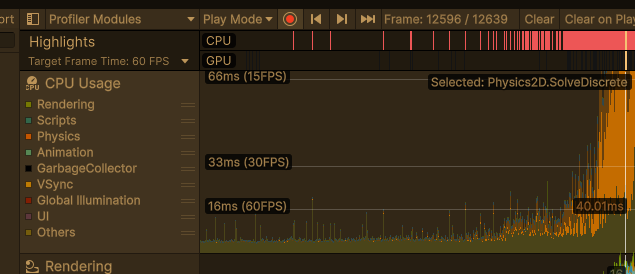
As shown in the image, as the ants were slowly spawned in, the resources spent on the Physics module quickly spiraled out of control. I was getting average frame rates of 1-2 FPS.
Troubleshooting revealed the cause: with ever-higher amounts of pheromones, every frame forced unity to tens of thousands of collisions between every single object, quickly scaling out of control.
Fixes:
The main fix was in how ants interacted with pheromones. Previously, I used a unity function that trigged at every collision between pheromones and a shape that represented the ant’s detection radius. Then, I added and removed all pheromones in range to an array.
Unfortunately, as the number of pheromones and ants increased, the number of times this function is called also gets scaled. Suppose, on average, an ant walks into 100 pheromones per second. That single ant would cause this pheromone function to trigger 100 times that second. 20 ants walking around could easily trigger the function 2000 times per second.
To fix this, I switched to using another function: “Physics2D.OverlapCircle”. At any given point, I could call this function, and it would return every object in a small circle around the ant.
The benefit of this is that I could call this function at any time. So instead of triggering at every collision, every ant calls this function at 1 second intervals. Now, 20 ants are hard capped at triggering this function 20 times per second, instead of 2000 times per second. I also randomized the start time for checks of each ant, meaning the checks are all distributed across a second, instead of piling up to form lag spikes.
I cannot overstate how significant this was to optimizing the time. This change alone almost singlehandedly got rid of all the resources spent on the CPU. Below is a screenshot for the new allocation of resources. As you can see, the FPS is now consistenly between 30 and 60, and the orange marks representing physics allocation is severly diminished.
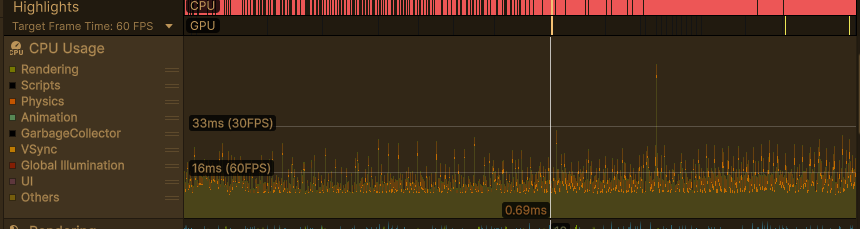
With this optimization in place, below is a video for the new pheromone model of ants:
Up Next:
With a more scalable system for pheromones in place, I plan to spend next week implemeting a basic pathfinding system for ants. This way, they could begin using both systems in tangent to pathfind across difficult obstacles. Additionally, I hope I could finally add in the anteater, and create basic attack patterns targeting ants.
Thanks for reading thus far, and see you all next week!
P.S: I uploaded my project on github. For those interested, all of my code is located in the Assets/Scripts folder. As I make progress in future weeks, I will continuing to update the Git repo.
Reader Interactions
Comments
Leave a Reply
You must be logged in to post a comment.
Hi Luke! I love reading your blog posts; I enjoy how detailed they are and how you go through your thought process. That’s not easy with such a complex project!
I’m wondering what happens if two ants bump into each other. In real life, I’ve seen them stay still for a second then go around each other, so I’m wondering if this is something you’ve seen yet or if you’re planning to account for it later.