
Week #4: Model Training
March 18, 2026
Intro:
Welcome to Week #4 of my blog! This week, I spent the majority of my time training the wind and fire detection model that I will eventually run on my Raspberry Pi 3 camera. This model I chose to use is the YOLOV8 nano, as I have experience using it from past projects and robotics. It also suits this use case well. If needed, I may use a YOLOV8 small instead after testing the nano. Let me now detail my experience training this model.
Kaggle
This was my first time sourcing datasets off of Kaggle for a personal project. For reference, I built my dataset by combining the D-Fire dataset (https://www.kaggle.com/datasets/sayedgamal99/smoke-fire-detection-yolo) and the FIgLib/HPWREN dataset (https://drive.google.com/drive/folders/1IKXN2-hxTrEQsIIKOxiUAuLgoxubA9Wq). I usually annotate data on Roboflow and download it from there, or hand-create datasets off of sources like Google Earth Engine (for satellite imagery). Kaggle was very convenient to use, and I look forward to using it in the future.
Issue 1: Slow Image Upload:
So now I’ll detail some issues that I’ve faced so far when trying to train my model. I had initially uploaded my entire dataset (combining both D-Fire and FlgLib, so roughly 23,718 images and 31,945 labels) into Google Drive, which took roughly 7 hours. I then mounted the drive and have the notebook pull images and labels from there. However, this led to ludicrously long epochs (see below):

Figure 1. Screenshot of epoch training time. Image by author, 2026.
It was taking 1 hour an 10 minutes to complete 29% of the first epoch of 100. This was simply unacceptable. So, I looked for solutions online, and saw a recommendation. It was to mount my drive, and then move my entire dataset into the runtime’s file system. The notebook would then pull files from there during training, instead of my Google drive. I wasn’t expecting this to work, but surprisingly, it did. It now takes roughly 15 minutes to copy the dataset over, and roughly 7 minutes/epoch to train.
Issue 2: Sleepy Laptop and Disconnecty Runtime:
Another issue kept running into was that the runtime would disconnect everytime my laptop fell asleep, or the browser just felt like it. It was incredibly frustrating. To fix this, I added a feature where the model’s current state is saved in a last.pt file after each epoch. When the runtime gets disconnected, I can input that last.pt file and have the notebook resume training from that checkpoint.
Updated Data Flow Diagram:
As I mentioned in a response to one of the comments on last week’s blog, the Data Flow Diagram I included there was actually slightly outdated, as I had changed some of my methodology. Please find the updated Data Flow Diagram here:
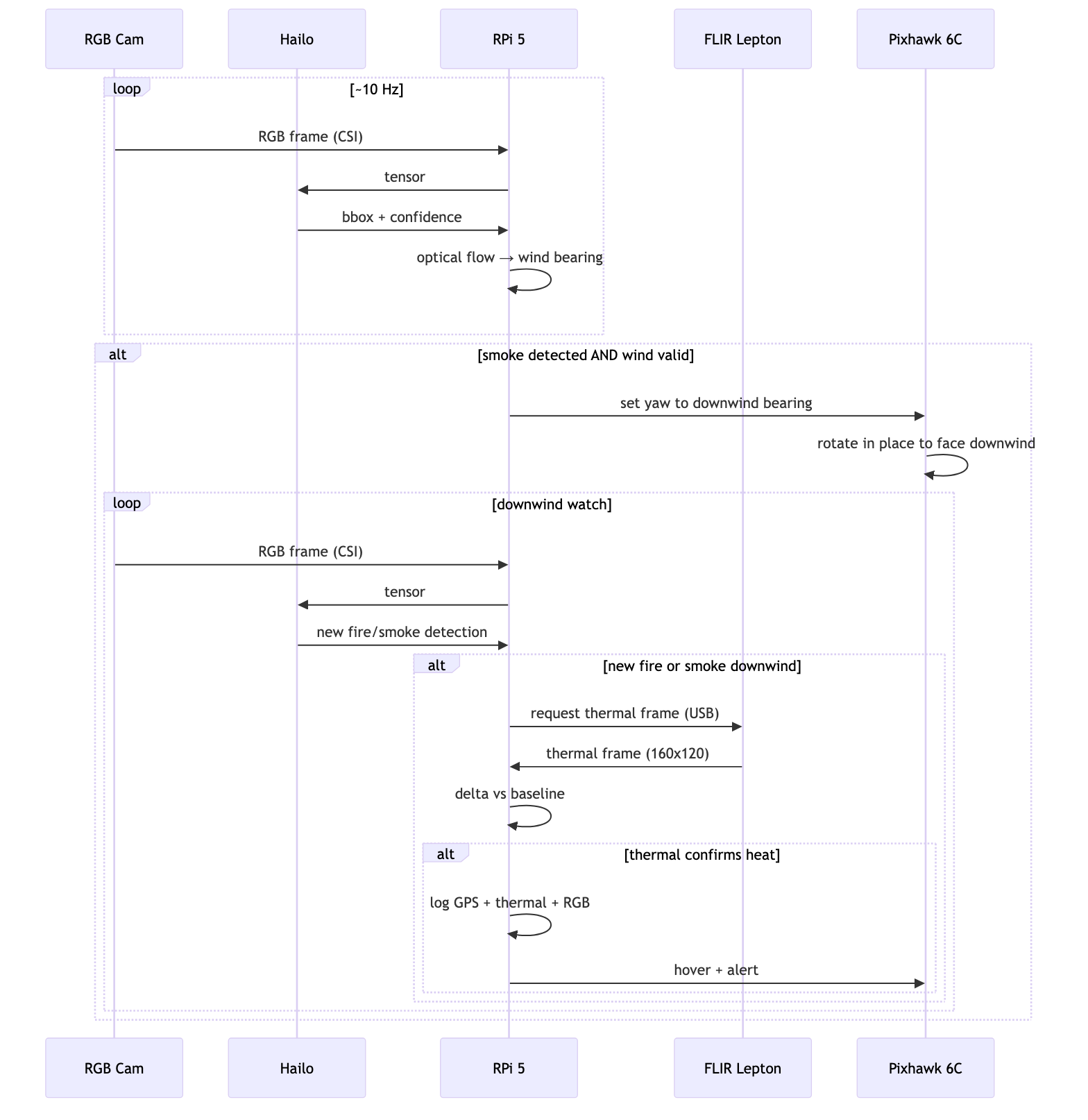
Figure 2. Updated Diagram of the Data Flow (Smoke Detection → Wind Estimation → Thermal Scan) pipeline created using Mermaid. Diagram by author, 2026.
Questions:
The biggest question for me this week would be: does anyone know a way to keep a runtime using a GPU (T4 in my case) from disconnecting when the GPU isn’t being used? What’s happening is that whenever I start the runtime, I set it as a GPU-High RAM runtime. But when I do the initial step of uploading the training data from drive into the runtime’s file system (before training), this process doesn’t use the GPU, prompting Colab to automatically disconnect the runtime. The only current solution I’ve found is buying Colab Pro+, which is $49.99/month. If there is no other solution I’m ready to do this, but I’d like to try a bit first before I do so.
That’s all for this week. Thanks for reading, and I hope to see you next week!
Reader Interactions
Comments
Leave a Reply
You must be logged in to post a comment.
Hi Anav! I really like how you were determined to look for and think of creative solutions around some of these frustrating issues (I’ve also run into them before and can relate!). I am also glad to hear your experience with Kaggle, which I know many (including myself) use for the easy access to large datasets. Did you have to do any significant additional preprocessing to the data that you got from Kaggle to fit your project, or was it largely ready for you to input into the model?
Hi Aanya! Because I used Kaggle, I ran into minimal issues. The only notable one would be that the label format for the D-Fire dataset was YOLO .txt, while FlgLib was Pascal VOC XML, leading me to separately parse each.
As for your GPU disconnecting, it just seems to be on the Google Colab’s side. Maybe you could do some parallel processing that uses a tiny amount of GPU when uploading? For the sleepy (I assume Mac) problem, I frequently use an app called Amphetamine to prevent my laptop from idling! It allows you to set the amount of time you want to keep your laptop open, but I don’t really advise using it for long periods of time as it drains battery and makes the computer miserably hot to the touch.
If the parallel processing doesn’t work, it might be time to bite the bullet and pay 9.99 for Colab Pro (If you don’t have it already), or the 49.99. Yikes.
I will try Amphetamine for sure. I think it will a good app to have in general, and it may be useful to me outside the context of this project. I’ll also give parallel processing a fair shot, but as it stands, it looks like I’ll probably need to hash out the $49.99. Thanks for the tips!
Hi Anav! Its great seeing you overcoming problems with the datasets! Im using Kaggle for the upcoming part of my model training so your tips might come in handy for me! My dataset right now is slightly smaller than yours so I don’t suffer from the timeout problem, but I have resorted to buying compute units as I go, which helps with computation time just a bit. A question for you, do you have any particular reason to combine Kaggle with your FlgLib dataset other than having more data to train on?
Hi Yujie, buying compute units sounds like the right path. I will try Amphetamine (the app Eric mentioned above), but because time’s getting constrained, I might have to bite the bullet and get Colab Pro +. As for the datasets, D-Fire has a lot of general fire imagery, sourced from web-scraping. But FlgLib is more centered around California wildland fires, making it more specific to my use case. Also, in FlgLib, only the smoke is annotated, providing more data for the model.
Your progress this week looks great! It’s really interesting that with all the big data collection and algorithm building, that you also come across a lot of simple problems, like your computer shutting down, or the download taking too much time. It’s very fun to hear your solutions to these problems as well. I can’t wait to see where this goes next.
Stay tuned!